Most advisor websites can convert more visitors without a rebuild. Run a 30-minute audit, then fix copy, calls to action, and layout in priority order, changing one thing at a time and measuring qualified consultation requests so content traffic turns into leads.
Updated: 10/30/2026 by Cullen Fischel

Tune up your existing site before you rebuild anything
Most advisor websites can convert more visitors by adjusting the pages they already have: clearer copy, sharper calls to action, and cleaner layout. Nielsen Norman Group recommends trying targeted improvements first and reserving a full redesign for structural problems that small fixes cannot reach. Results vary by firm, audience, and traffic source, and no change here carries a promised outcome.
Quick Definition: Conversion. A conversion is a visitor completing an action you want. Conversion rate is conversions divided by the relevant total of visitors, users, or sessions, multiplied by 100. For most advisors, the primary conversion is a completed consultation request. Guide downloads and newsletter signups are supporting micro-conversions.
Key points
- Measure qualified consultation requests, not only clicks or raw form submissions.
- Headline and audience messaging, trust signals, calls to action, form friction, and page layout are the main places to look.
- Calls to action such as Schedule a Free Consultation pair well with a scheduling tool.
- Change one thing at a time and compare results using the same definitions each time.
- Keep what already works and fix the biggest bottleneck first.
Testing matters because the same change can help, do nothing, or backfire. In one CXL form experiment, a privacy reassurance message reduced conversions by 18.7%. A fix that sounds sensible is still a hypothesis until your own numbers confirm it.

Content brings visitors in, and your website decides what happens next
Blog posts, emails, videos, and search rankings all send people to the same place: your website. If that page has no clear next step, the attention you paid for in time or money mostly leaves with the visitor. A done-for-you content system can keep traffic arriving, but the site determines how much of it turns into identifiable leads.
Content tends to work on awareness and consideration. A reader finds your article on retirement income, trusts you a little more, and wants to know what to do next. A conversion path is the mechanism that moves that anonymous visitor toward becoming a known lead. It usually connects relevant content, a clear call to action, a focused landing page, and a simple form or booking link.
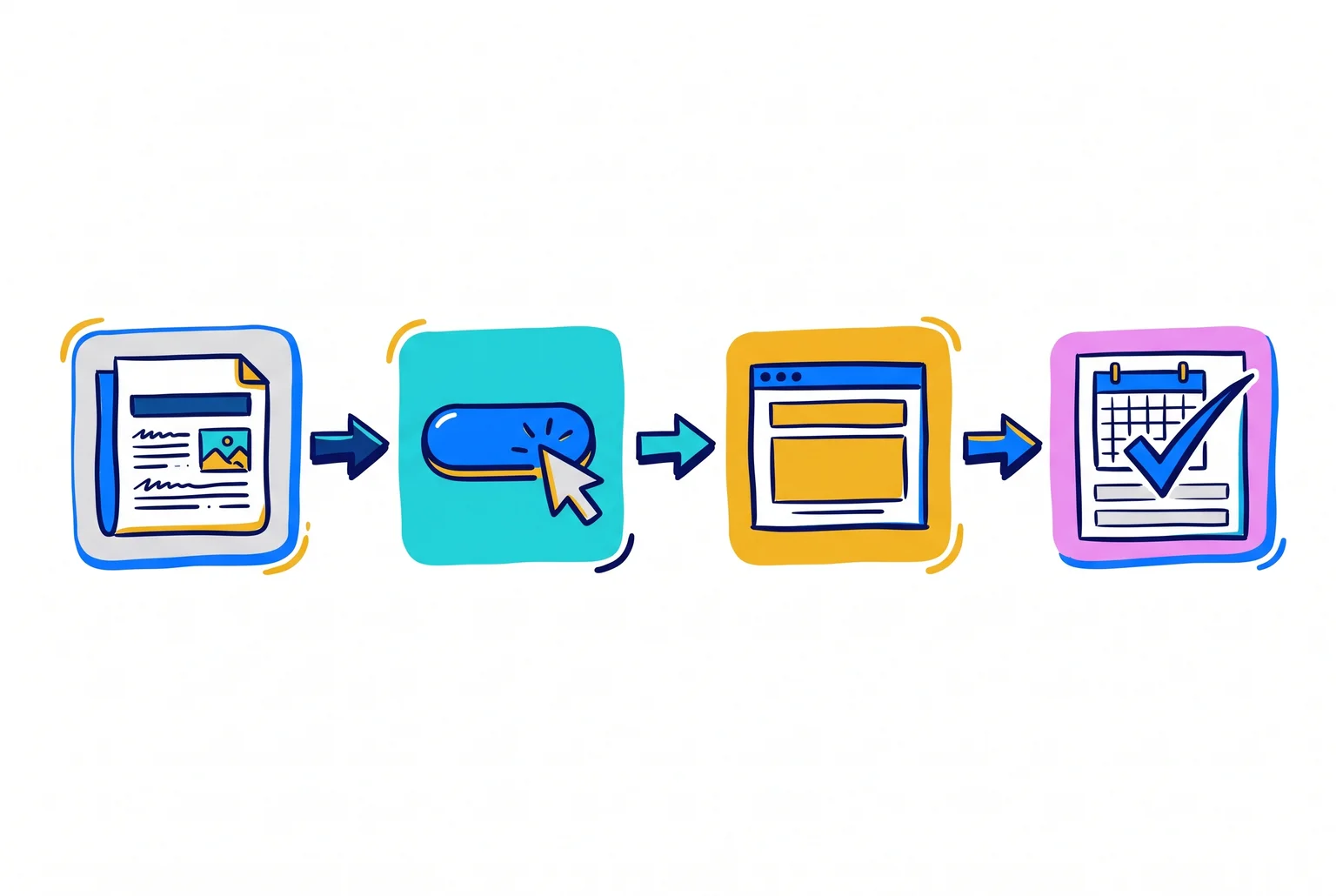
Informational pages often fail to convert because they lack an explicit next step. Relevance matters too. A CTA unrelated to the article creates friction, so an article on Social Security timing should lead to a related guide or a consultation request, not a generic "Contact us."
Placement is worth testing. In a HubSpot test of 10 blog posts, anchor-text CTAs generated up to 93% of a post's leads, while end-of-post banners averaged 6%. Results will differ on your site, but many readers never reach the bottom of a page, which is why HubSpot recommends testing several placements instead of relying on one banner.
Once someone converts, follow-up matters. For example, an automated email sequence can nurture a new lead toward a consultation.
Measure outcomes that reflect real interest, such as consultation bookings, completed forms, and lead-magnet downloads, rather than page views alone.
Conversion tuning has a limit. It can make the traffic you already have more productive, and it can help make lead flow more consistent. It does not replace consistent content creation and distribution. A well-tuned site with little traffic still produces few leads, and a busy site with no clear path wastes much of what it earns. The two need to work together.
A 30-minute audit to find where visitors drop off
Spend half an hour with Google Analytics 4 (GA4), your phone, and a few acquaintances before you edit anything. The goal is to see which pages and steps lose visitors, so you fix those first.
Confirm your primary action is tracked. Pick one action, such as a consultation request. Check that its event fires and is marked as a key event. GA4 lists generate_lead as a recommended event for form submissions and similar actions.
Find your top landing pages. In the landing page report, look for pages with substantial traffic but few key events. Do not assume the homepage is the problem page.
Compare traffic sources. In the traffic acquisition report, add landing page as a secondary dimension. Compare sessions, engagement rate (the share of visits that were engaged, the inverse of bounce rate, which counts visits that were not), and key events.
Check mobile against desktop. Compare the same pages by device. If mobile is clearly worse, open the page on your own phone. Buttons and form fields should be at least 48 pixels with spacing between them, and body text should be 16 pixels so no one has to pinch-zoom.
Measure form completion. Track form starts and successful submissions separately. Completion rate is completed forms divided by starts, times 100. Submit your own form on a phone.
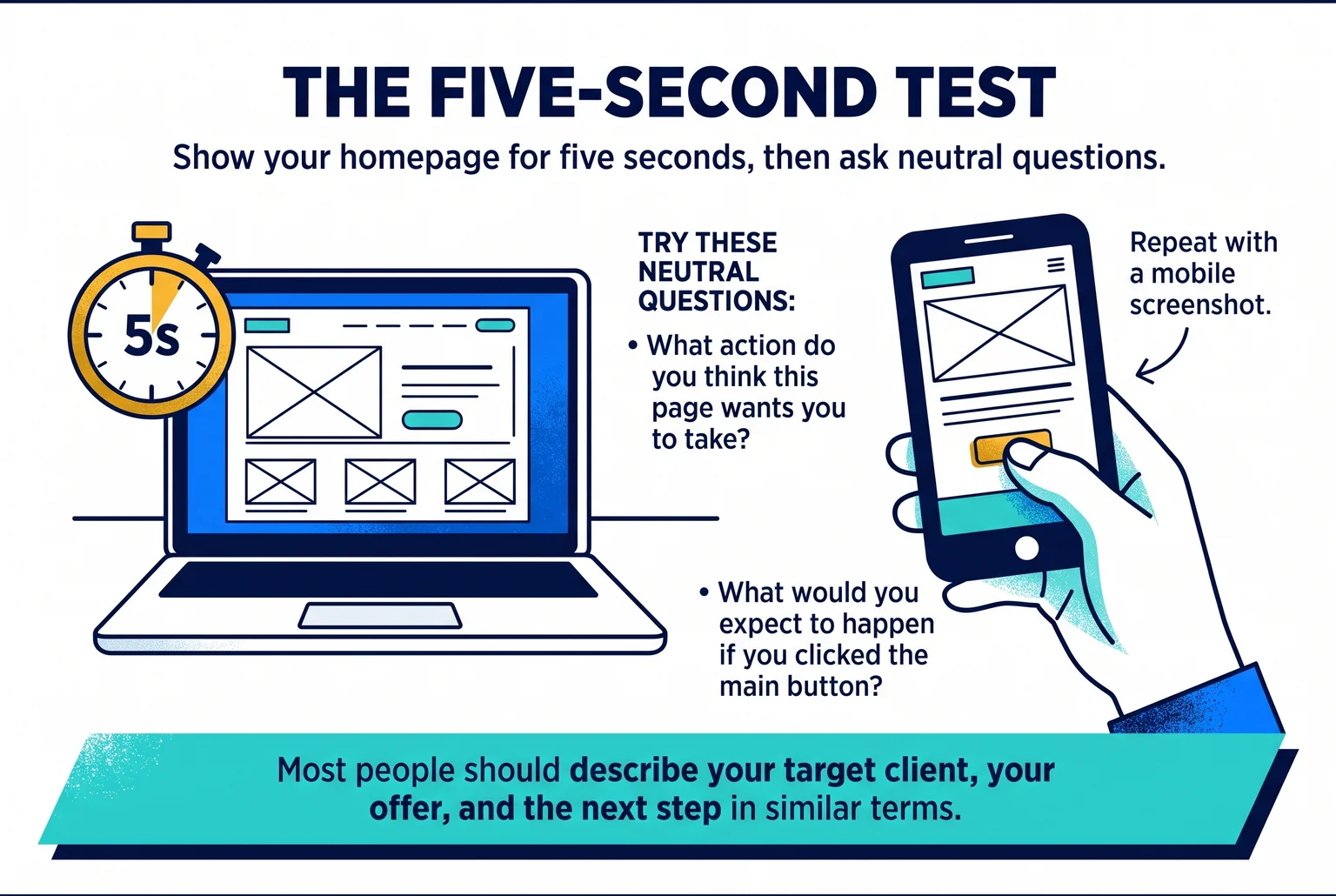
Run a five-second test. Show a screenshot of your homepage for five seconds, then ask neutral questions. Try "What action do you think this page wants you to take?" and "What would you expect to happen if you clicked the main button?" Repeat with a mobile screenshot. Most people should describe your target client, your offer, and the next step in similar terms.
Pro Tip: Write down your baseline numbers before changing anything, using the same definitions each time. Use your own past results as the comparison, not an industry target.
The five-second test shows first impressions only. It does not replace analytics or full usability testing.
Compliance check: Before adding tracking tools, session recordings, or testimonials, review them with your compliance team. Tracking may need privacy disclosures, and testimonial use falls under the SEC marketing rule.
Three copy fixes to make first on your homepage and service pages
Rank these by how much confusion each one removes for a first-time visitor. Start at the top of the homepage and work down.
1. Name the client and the outcome in your headline and subheadline
Visitors should be able to tell within seconds whom you serve and what you do for them. A headline can name the audience and the outcome, and a subheadline can explain the service behind it rather than repeat a slogan. Plain, concise wording helps people scan, so keep both to one short sentence each.
For example, a headline might read "Retirement planning for physicians in their 50s," with a subheadline such as "Fee-only advice on cash flow, taxes, and the transition out of practice." These are starting points to adapt, not proven winners. Test them against your baseline from the audit.
Why it matters: a visitor who cannot tell whether the page is for them usually leaves without clicking anything.
Tradeoff: naming a niche can feel like turning away other clients. Your other services can stay on the site. The headline only decides who feels addressed first.
2. Replace jargon and vague "holistic" language
Nielsen Norman Group advises against unexplained terms such as "proprietary," "comprehensive," or "holistic" unless you define them right away. If you say "holistic wealth management," follow it with what you actually do, such as investment management, tax planning, and estate coordination. Then cut the label if the list says it better.
Why it matters: a prospect cannot compare you with other advisors when every site uses the same words.

3. State the next step and add trust language you can support
Tell visitors what happens after they act, and match the wording to the commitment: "Book a 30-minute introductory call. We'll talk about your goals and whether we're a fit." Placing that line near the button removes a common unknown.
Trust language works the same way. Any claim has to be backed by evidence, because marketing materials may not include untrue statements, omit material facts, or make unsubstantiated claims. Credentials, years in practice, your fee structure, and how you are compensated are facts you can state and document. Do not promise outcomes.
Why it matters: visitors hesitate when the next step is unclear or the claims sound too good to check.
Tradeoff: testimonials and endorsements are allowed under the SEC Marketing Rule, but they carry disclosure and oversight requirements, including whether the person is a client and whether they were compensated. A short, plain, checkable statement of fact is often easier to publish than a quote.
Common Mistake: writing about the firm instead of the client's problem. "We are a full-service wealth management firm with a client-first philosophy" describes you. "Helping business owners plan the sale of their company" describes the visitor's situation.
Compliance check: have your compliance team review every headline, subheadline, and trust statement before it goes live. FINRA standards also require that communications be fair and balanced and avoid promissory language or guarantees, and a hyperlink or footnote cannot fix a misleading claim.
Four CTA fixes: one primary action, specific labels, a softer option, and shorter forms
Rank these by effort, starting with the cheapest edit.
1. Pick one primary action per page
Each page should have one primary CTA, with a lower-commitment secondary action for visitors who are not ready. For most advisor pages, the primary action is booking an intro call. Remove competing buttons of equal weight.
2. Name the outcome on the button
Labels like "Submit," "Continue," or "Get Started" say little about what happens next. Pair a verb with the result: "Book My Intro Call" instead of "Contact Us," or "Get My Personalized Retirement Checklist" instead of "Submit."
The label must match the destination. "Book My Intro Call" should open a scheduling tool, not a generic contact form. Microcopy beside the button, such as "20 minutes · No obligation," can reduce perceived commitment. One A/B test reported that changing "Start your free 30-day trial" to "Start my free 30-day trial" increased clicks by 90%. That was one test on one site, so treat first-person wording as something to try.
3. Add a secondary option for visitors not ready to book
A guide or email signup keeps those visitors in touch, and email follow-up can nurture them later. It captures permission, not a meeting, so it will not turn every reader into a qualified lead. Compliance should review the guide and the follow-up emails.

4. Trim the form, then check lead quality
Ask only for basic information. The average web form in 2019 had about five fields, but shorter is not always better. One case study tied a move from 11 to 15 fields to a 109% conversion lift. Shorter forms may raise volume while bringing in less-qualified leads, so judge a form by meetings held, not submissions alone.
What to expect: these changes may reduce friction, but they do not guarantee more leads. Place each CTA where the visitor has just learned what they need to decide, such as after a service explanation, and test one change at a time.
Six layout edits you can make on your current pages
These edits use the pages and templates you already have: reordering blocks, resizing elements, and compressing files. If your platform locks a header or section order, work within the blocks you can edit.
Quick Definition: above the fold. The part of a page visible before a visitor scrolls. On a phone, that is much less than on a laptop.
Nielsen Norman Group's eye-tracking research found that 57% of viewing time fell above the fold, and 74% fell within the first two screenfuls.
- Top of the page: put the headline, subheadline, and primary button on the first screen, with a hint of the next section peeking in.
- Section order: follow the visitor's questions. Who you help, what you do, how it works, proof, then the next step.
- Header button: add your primary CTA, such as "Book My Intro Call," to the navigation menu so it stays visible.
- Trust elements: place credentials, reviews, and your Form CRS link near the CTA or in the footer. The SEC requires the current Form CRS to be posted prominently. Use the CFP® mark next to the individual's name, not as a firm badge. Compliance should approve all of it.
- Mobile: check the homepage, contact page, and top landing pages on a real phone. Look for small text, tight buttons, and hard-to-finish forms.
- Speed: run those pages through PageSpeed Insights. Google's good thresholds are LCP at or below 2.5 seconds, INP at or below 200 milliseconds, and CLS at or below 0.1. Compressing oversized images is often the first fix.
Search Console's Core Web Vitals report groups URLs with shared problems, so one template edit can fix many pages at once. Rerun the tests after each change. Faster pages remove friction, but they do not guarantee more leads.
A ranked fix list and a one-change-at-a-time review method
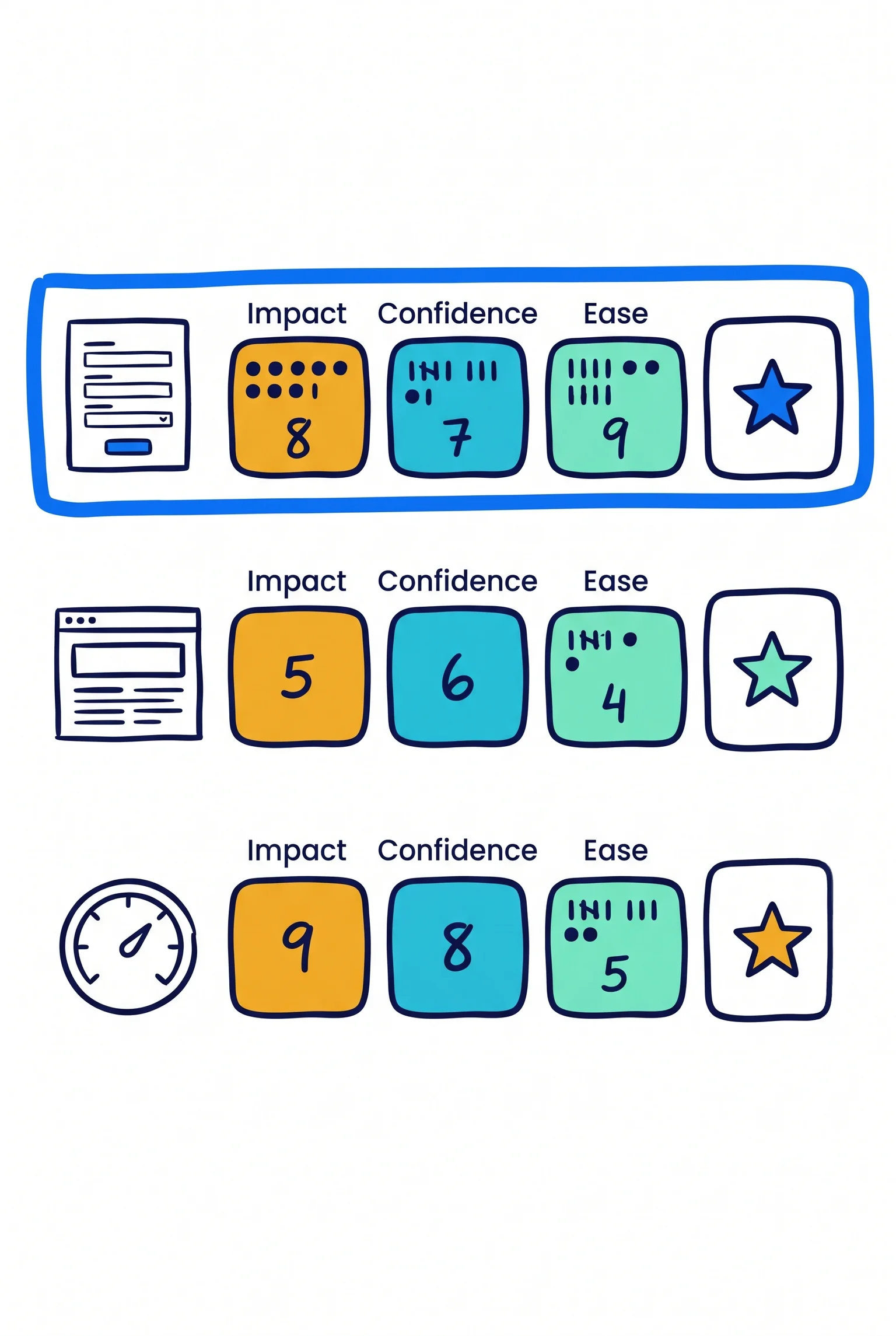
Rank each fix with ICE: score Impact, Confidence, and Ease from 1 to 10, then average the three. Confidence should rest on your audit findings, not a hunch. ICE is a fast ranking aid, and it does not prove a change will work. PIE (Potential, Importance, Ease) works the same way, usually multiplying the scores.
Impact below is potential and relative. Your traffic, audience, offer, and market conditions decide what actually happens, and no outcome is guaranteed.
| When | Fix | Effort | Potential impact |
|---|---|---|---|
| Week 1 | Specific homepage headline and subheadline | Low | High |
| Week 1 | One primary CTA per page, with specific button text | Low | High |
| Week 1 | CTA button in the header | Low | Medium |
| Weeks 2-3 | Shorter contact form | Low to medium | Medium to high |
| Weeks 2-3 | Trust elements near the CTA, compliance-approved | Medium | Medium |
| Weeks 2-3 | Service page section order and mobile fixes | Medium | Medium |
| Ongoing | Low-commitment secondary offer, such as a guide | Medium | Medium |
| Ongoing | Page speed, image compression, message match with content | Medium | Lower to medium |
Reorder the list if your audit points elsewhere. A form that most mobile visitors abandon belongs ahead of a headline rewrite.
Reviewing one change at a time
- Write down the baseline: the current conversion rate on the page, using the same definition each time.
- Make one change. Note the date.
- Set your decision rules first. Required traffic depends on baseline rate, the smallest lift you care to detect, and your significance threshold. Optimizely's calculator gives a target.
- Run for at least one full business cycle, typically seven days, so weekday and weekend behavior both show up.
- Review, keep or revert, then start the next change.
Most advisor sites have modest traffic and may never reach a conventional target in a reasonable time. In that case, treat results as directional. A plain before and after comparison has no control group, so seasonality, a newsletter send, or a market swing can look like a win or a loss. Reading it alongside the audit's form and mobile data gives you a more cautious, more useful picture.
Common questions about tuning an advisor website
How long before changes show results? Allow at least one full week per change, and expect longer on modest traffic. Results vary with your audience, offer, and traffic, and nothing is guaranteed.
Can a low-traffic site test? Conventional A/B tests may be out of reach, but five users in a qualitative usability test typically surface most major problems. Session recordings and a few client interviews can add to that, and combining methods is safer than trusting one.
How does this fit with SEO and email? SEO and content bring visitors, and the tune-up gives them a path to act. In one MarketingExperiments test, email follow-up lifted conversion from 0.80% to 1.25%, though one test on one site may not carry over to yours.
Does compliance limit CRO? Testimonials, endorsements, and "top advisor" badges are not automatically prohibited but must meet the SEC marketing rule, including required disclosures. Have your compliance team review changes first.
When is professional help useful? Outside support may help if you lack time to run reviews, want ongoing content and email follow-up, or need a second opinion on optimization priorities and lead generation.
Book a free strategy call to set your tune-up priorities
Start with the headline, the one primary button, and the form on your highest-traffic page, then change one thing at a time and review results.
If you want help ranking those fixes, book a free strategy call with Pro Financial Design. We learn about your practice, goals, and current marketing, then recommend a plan. We can also discuss how LeadPro, a done-for-you content and SEO service, could send visitors to a site that converts them. Results vary, and nothing here is guaranteed.

About Cullen Fischel
Cullen Fischel is the lead designer at Pro Financial Design. So, if you’ve ever worked with us, you’ve worked with Cullen on strategy, design, and content creation for your project. Cullen’s got years of experience developing websites, brands, logos, lead magnets, digital marketing strategies, and social and email content for his clients. If you have any questions for him, just send us a message!

Want more financial advisor marketing tips and guides? Check out: